How to Build a Game with AI in 2026
Introduction: Why build your own game?
Building your own game feels different from using apps. It shifts you from consuming to creating. But the hard part is turning an idea into something playable, and that’s where most people get stuck.That’s where this guide comes in. This guide walks you through that process step by step.
Major challenges in buiding a video game
Making a game sounds exciting. In practice, it’s rarely effortless. A simple idea quickly turns into a set of creative and technical challenges that demand time, patience, and constant iteration.
- Real-time interaction
Even small delays or missed inputs can break the experience. - Performance and stability
Visual effects look great, but poor optimization quickly causes lag and stutter. - Getting the “feel” right
A game can work and still feel wrong, often requiring constant fine-tuning. - Cross-device behavior
What feels smooth on desktop may feel awkward on mobile. - Setup before play
Engines, assets, and configuration often stop projects before they start.
Although these challenges remain, the landscape is shifting. AI game builders are collapsing the distance between wishing and building, allowing ideas to become playable almost instantly.
How vibe coding tools like MeDo solve these problems?
Before diving in, let’s clarify one thing: what is an AI game builder?
An AI game builder helps you build a game with AI faster and with far less technical friction. MeDo is a free, no-code, online AI game builder designed to turn ideas into playable games without complex setup or prior development experience. Instead of writing every line of code, you describe what you want in plain language, and the system generates interactions, visuals, and basic logic for you.
What once took weeks—setting up controls, wiring logic, and creating a first playable scene—can now happen in minutes. Compared to traditional game development, this shortens the gap between an idea and something you can actually play. Among these tools, vibe coding stands out as a more flexible, creator-friendly approach, letting you refine ideas step by step online.
In practice, this approach changes how games are built in a few key ways:
- Faster interaction design
Clicks, gestures, and triggers can be set up quickly without manually wiring complex systems, letting you test responsiveness early instead of debugging it later. - Visual freedom without performance stress
Particles, animations, and effects are easy to explore without constantly worrying about frame drops or rendering pipelines. - Iterating on "feel" in real time
With less setup overhead, the feedback loop gets shorter—you adjust timing, spacing, and feedback and immediately see the result. - Smoother cross-device behavior
Device differences are handled behind the scenes, keeping interactions consistent across screens and input methods. - From idea to playable—fast
Most importantly, heavy upfront work disappears—you can move straight into building and testing, turning ideas into playable moments almost instantly, often starting free and without deep technical knowledge.
How to make a game using the AI coding tool MeDo
Before beginning, here’s the high-level flow for how to make a video game with free, no code tools like MeDo without messy setup or heavy logic wiring.
0. Sign up and create a new MeDo project
- Build a first playable prototype
- Add camera & gesture recognition
- Make particle switching smooth
- Add background atmosphere & BGM
- Polish details
- Test the full experience
Now let’s build it step by step.
Step 0 Sign up and create a new MeDo project
MeDo can build any kind of game without coding. To get started, we need to create an account on MeDo and open a new project page.


Find the MeDo official website & Sign up in MeDo


Set your account & Create a new project
Step 1: Create the first playable prototype
This step is about getting something interactive on screen: text, shapes, particles, and a few buttons. Don’t worry about polish yet.
Prompt:
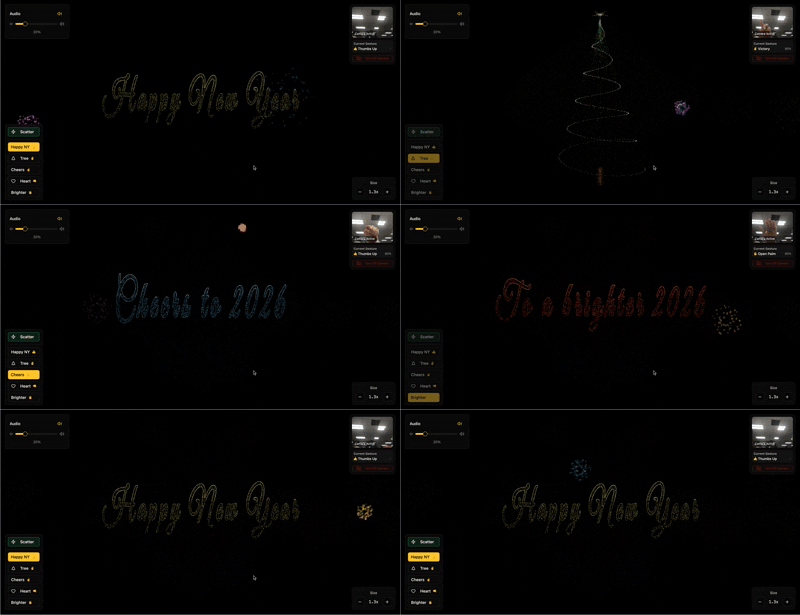
Create a single-page New Year experience with glowing particle typography on pure black. Must be readable glyph silhouettes, not random dots.
Text: Happy New Year, Cheers to 2026 and To a brighter 2026Pattern: Christmas tree and Heart
Use a fixed particle pool shared across states; particles morph by lerp (no respawn).
Start at “Happy New Year” and cycle states in this order: Happy → Tree → Cheers → Heart → Brighter.
Add minimal luxury UI buttons: Scatter and 5 state shortcuts.Target ≈9000 particles desktop / ≈5000 mobile.
At this point, you have a simple prototype you can click, switch, and refine.
Step 2: Add camera & gesture recognition, plus click-based switching
MeDo's camera access is convenient and quick, which is key to the game's immersive interactivity.
Prompt:
Increase font size and switch to a script font.
Add a “Use Camera” toggle using getUserMedia, show a small mirrored selfie preview.
Map gestures precisely: 👍 Happy New Year, ✌️ Christmas tree, ☝️ Cheers to 2026, 👊 Heart, 🖐 To a brighter 2026.
Add gesture smoothing (6–10 frame average), hold-to-trigger (0.3–0.5s), cooldown (1–1.5s).
If camera permission is denied, fall back to button-only mode with no errors.

You can now switch particle states using hand gestures.
Step 3: Make particle switching feel premium
With the layout in place, add interactive particle effects. Particles should respond directly to clicks or gestures, without any auto chaos.
Prompt:
Keep all existing features. Do not auto-loop or auto-scatter after a state forms, hold indefinitely until user action.
Lock transitions so only one runs at a time (≈1.6s).
Enforce per-state dominant colors: Happy=gold, Cheers=blue, Heart=pink, Brighter=red, Tree=tree palette only.
Do not apply any global palette that overrides state colors.
Transitions now feel controlled and visually stable.
Step 4: Add background effects & BGM
A pure black background calls for some simple accents, and playing music also lends the game a more cheerful and festive atmosphere.
Prompt:
Add subtle background fireworks behind the formation (1 burst every 3–6s), avoid center, keep small and faint. Keep snow/star ambience behind the main shapes.
Add a piece which is similar to Auld Lang Syne as background music, and set the volume control button.

Step 5: Polish local details
Now let's refine some details. Here are some options to consider:
Prompt:
Increase formation size (desktop 50–70% width, mobile 70–85%). Add a Size slider (0.7–1.6x).
Support Ctrl/Command+wheel zoom + pinch zoom, no rotation.
Tree must show brown trunk, green leaves, one silver spiral ribbon with flowing highlight, gold star with slow rotation.

Step 6: Test the full experience like a real user would
Ultimately, use the game the way others will. Switch states, try gestures, adjust size and audio, then leave it idle to check stability and readability.
Once it feels solid, click Publish. Add a title, description, and covers for desktop and mobile, then share it via link or QR code.
But don’t scroll away just yet! 😉 A few practical tips are coming up to help you polish the experience and avoid common vibe coding pitfalls.
TIPS
- Be specific about what you want. If your idea feels vague, use AI to help you clarify it before you start building.
- Don’t over-describe visuals in text. Reference images or uploaded assets communicate faster and more clearly.
- Use MeDo’s section-level edits and plugins. Bring in AI plugins whenever you need extra capability.
- Confirm core mechanics before building. Make sure MeDo already supports physics, particles, levels, maps, and other essentials.
- Define gameplay rules first. Controls, damage, death, restart logic—anything that affects how the game works.
- No rules = AI guesses. Clear rules mean MeDo builds exactly what you intend.
- Be precise when refining details. Point to the exact issue and provide a clear reference.


Tip 3: Using section-level edits and AI plugins to refine a game interface & Plugin marketplace
IMPORTANT:
Don’t want to go through the whole process yourself? Hit this source, play around with it, and remix it into your own version.
Or explore the Marketplace and find a template that fits your vibe.
How much does it cost and how long does it take to build a game with AI?
So building a game with AI in 2026 is fast and low-cost. With AI game builders, you can start for free, work online, and create a playable game in hours or days instead of weeks or months, spending less time on setup and more time shaping the game’s feel.
Conclusion
If you're looking to build a game with AI in 2026, without code, high costs, or complex setup, this workflow shows the fastest path. AI game builders and vibe coding tools like MeDo shorten the distance between an idea and something playable. With clear rules, interactions, and visual intent, you can go from idea to prototype in minutes, not months.
FAQs
1. Can MeDo be used for apps or websites, not just games?
Yes. While this guide focuses on games, MeDo is a general-purpose AI coding platform. You can build websites, productivity tools, interactive experiences, and even full e-commerce websites with products, carts, and payments. Games are just one use case.
2. What does “AI coding game challenge” mean?
It refers to the difficulty of turning an idea into a playable game: handling interactions, visuals, performance, and cross-device behavior without getting buried in technical setup. In our blog you could find complete, practical path to solving that challenge step by step with MeDo.
3. What makes MeDo different from traditional game engines or other AI tools?
MeDo removes upfront friction. Instead of configuring engines and pipelines, you work directly with ideas, interactions, and feel. It shortens feedback loops and supports real-time iteration, making creation lighter and more playful.
4. Is MeDo free to use?
Yes. You get 300 Credits when you sign up, plus 100 Credits daily just for logging in. You can also earn Credits by liking or publishing templates in the Marketplace. Paid plans are affordable and offer generous bonuses.

5. Do I need programming or game development experience?
No. MeDo is designed for creators of all backgrounds. As long as you can describe how your game should behave and feel, MeDo can help turn that idea into a playable experience. No engine or coding experience required.